Frequently Asked Questions
Short answers to the things people ask most. For step-by-step instructions, see the User Guide; for fixes, see Help.
Getting started
What is Trace Elements for?
It helps you track how much of a chosen trace element — nickel by default — you take in through food each day, and compare your daily total against a limit you set. It's designed for people following a restricted diet who want to spot high-content foods and watch for patterns over time.
Which elements can I track?
The app ships set up for nickel, the element with the most complete built-in food data. You can change the tracked element in Settings → Tracked Element. Each element keeps its own set of food values, so switching gives you a clean, element-specific database to build on.
Do I need an account or an internet connection?
No account, ever. The app works fully offline using its built-in food list. A connection is only used if you choose to look up a food that isn't already in your database (see privacy).
Values & calculations
What do the numbers mean — µg and µg/100g?
Food reference values are stored as micrograms (µg) of the element per 100 grams of food. When you log an amount, the app scales that figure to what you actually ate. For example, a food listed at 510 µg/100g, eaten as a 30 g serving, contributes 510 × 30 ÷ 100 = 153 µg to your day.
Why does one food have several entries with different values?
Trace-element content in food varies with soil, cultivar, processing, and region, so where the source data provides regional figures the app keeps them — for example cashews, cashews (Spain), and cashews (USA, national). The plain, unlabelled entry is the general-purpose value and appears first in autocomplete. Pick a regional variant only if you know it fits what you ate.
How accurate are the values?
Treat them as ballpark guidance, not lab results. They are population-level estimates; the actual content of any single serving varies with origin, cultivar, soil, processing, and preparation. They're meant to help you compare foods and notice patterns, not to certify an exact intake.
Can I correct or add a value?
Yes. In Food Management, type the food name, enter a number in the Value (µg/100g) field, and tap Save to DB. Your value is stored locally for the element you're tracking and used everywhere that food appears.
What's a "compound food" and how is its total worked out?
A compound food is a dish made of several ingredients — like a sandwich or a burger. The app holds a recipe of ingredient names and standard portions, looks up each ingredient's value, and sums them into the dish total. You can also build your own in My Recipes and adjust portions or swap ingredients to lower the total. See the User Guide.
Reading the app
What do the ring and calendar colors mean?
By default the day turns amber (caution) at 80% of your limit and red (over) at 100%. Both thresholds are adjustable in Settings.
Can I change my daily limit and the warning thresholds?
Yes — all three live in Settings: the Daily Limit, the Caution threshold (percent of the limit for amber), and the Over-limit threshold (percent for red). Set them to match the targets your clinician or diet plan uses.
Can I export my history?
Yes. On the Trends & History screen, the PDF icon exports a report of your history that you can save or share — handy to bring to a clinic visit. You can also create a full data backup file in Settings → Backup & Restore.
Privacy & data
Where is my data stored? Is anything uploaded?
Your daily logs and food database live on your device. Nothing is uploaded to any server operated by the app's developer. The only network requests are optional food lookups you trigger yourself: the USDA FoodData Central lookup goes directly to USDA's public API, and the in-app web lookup queries Google. Both happen only when you search for a food that isn't already in your local database.
Where do the food values come from?
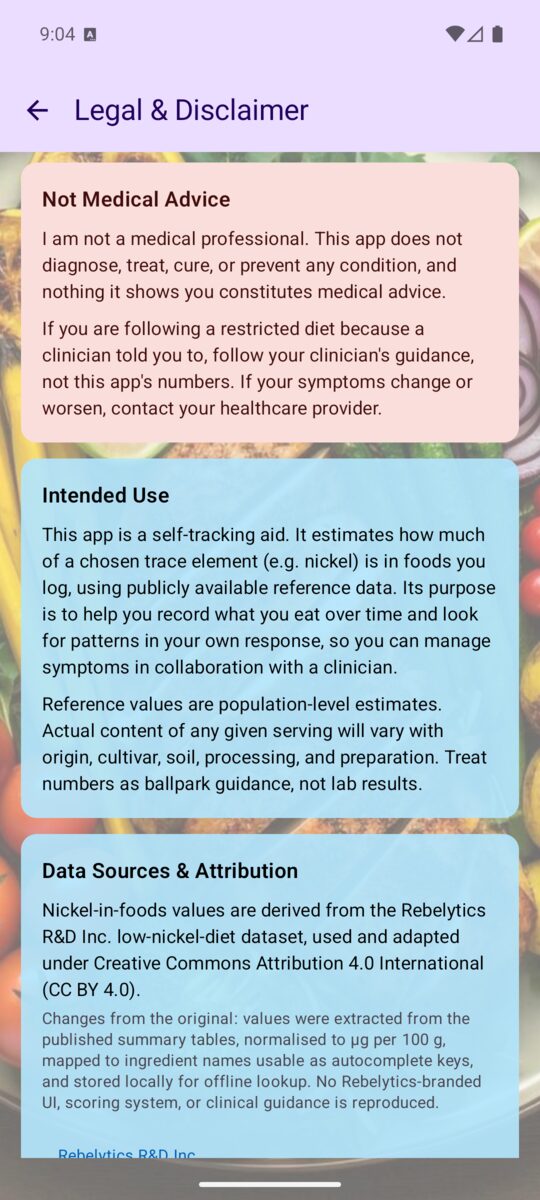
Nickel-in-food values are adapted from the Rebelytics R&D Inc. low-nickel-diet dataset, used under the Creative Commons Attribution 4.0 International (CC BY 4.0) license. Values were taken from the published summary tables, normalised to µg per 100 g, and mapped to ingredient names for offline lookup. No Rebelytics-branded interface, scoring system, or clinical guidance is reproduced. Optional supplementary lookups use USDA FoodData Central, which is public domain in the United States.
How do I move my data to a new phone?
On the old device, open Settings → Back up to file… and save the file somewhere you can reach later (such as Google Drive). On the new device, install the app and use Settings → Restore from file… to load it. Note that restoring replaces any data already in the app on the new device.
Medical disclaimer
Is this medical advice?
No. Trace Elements is a self-tracking tool, not a medical professional or device. It does not diagnose, treat, cure, or prevent any condition, and nothing it shows constitutes medical advice.
It estimates how much of a chosen trace element is in foods you log, so you can look for patterns in your own response and manage symptoms in collaboration with a clinician. Reference values are population-level estimates and the actual content of any serving will vary.
If you are following a restricted diet because a clinician advised it, follow their guidance over the app's numbers. If your symptoms change or worsen, contact your healthcare provider.